
Enabling TSW controller support for Xbox for Windows
Follow this guide if you are running the Xbox for windows version of Train Sim world 5+
Find the Train Sim World folder where the game is installed. For example on my computer it is:
F:\XboxGames\Train Sim World- 5\Content
Find the file gamelaunchhelper
Make a shortcut of this file by right clicking it and selecting Create Shortcut
Right click the shortcut you have just created and click Properties
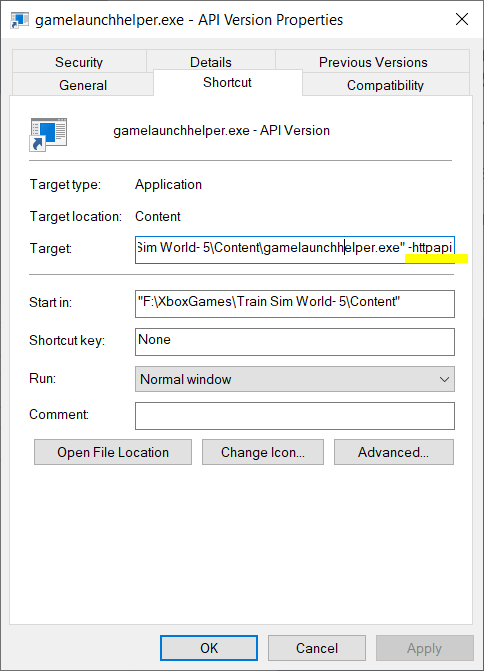
In the ‘Target’ text box, you will need to add -httpapi after the text that is written in there. Like this:
Ok that, and then open the TS Controllers interface.
Go to the Advanced tab and change the TSW Platform option to Xbox for Windows
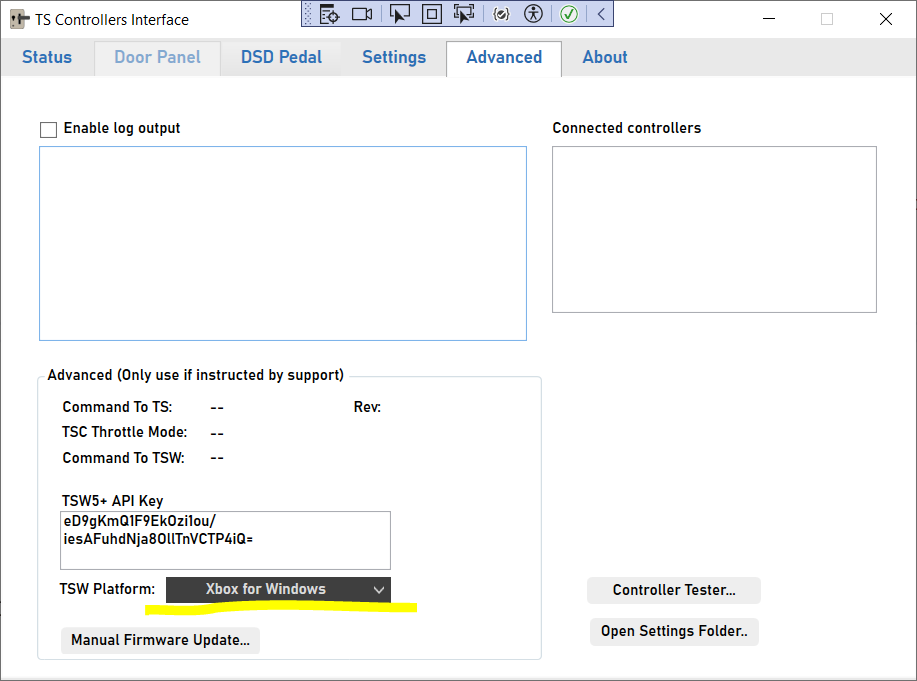
Restart the TS controllers Interface and then it should detect when TSW5+ is running.
You will need to run TSW5+ from the above shortcut you created, otherwise the launch option will not apply and the controller support will not be enabled.
If this does not work, please use the contact page to get in touch with TS Controllers for help.
